


If you are stepping into the fascinating world of programming, you have probably heard that Python is the most popular language right now. But why is Python so famous? Is it just because the code is easy to read? Well, that is only half the story.
The real power of Python lies in its incredible libraries. A library is simply a collection of pre-written code that you can use to solve complex problems without writing everything from scratch. When it comes to Data Science, Artificial Intelligence, and Data Analysis, learning how to use Pandas and NumPy in Python is where your real journey begins.
If you want to become a data scientist, a data analyst, or just want to write smarter code, understanding these two libraries is an absolute must. In this beginner-friendly guide, we will break down exactly what they are, why you need them, and how they work together to make your life easier. Grab a cup of coffee, and let’s dive into the world of data!
1. What is NumPy? (The Math Genius)

Let’s start with the foundation. NumPy stands for Numerical Python. Created in 2005 by Travis Oliphant, it is the core library for scientific computing in Python.
Imagine you have a massive list of numbers, and you want to multiply every single number by 2. If you use a standard Python list, you would have to write a loop that goes through each number one by one. This is fine for ten numbers, but what if you have ten million numbers? Standard Python loops will take a lot of time and slow down your computer.
This is where NumPy comes to the rescue. NumPy introduces a powerful concept called the N-dimensional array (or ndarray).
Why are NumPy Arrays better than Python Lists?
Lightning Fast Speed: NumPy arrays are written partly in C language behind the scenes. They process mathematical operations up to 50 times faster than traditional Python lists.
Less Memory Usage: Python lists store a lot of extra information for every single item. NumPy arrays store items in a continuous block of memory, making them highly efficient and lightweight.
Complex Math Made Easy: NumPy comes with built-in functions for linear algebra, matrix multiplication, statistics, and generating random numbers. You can add, subtract, multiply, or divide entire arrays with just a single line of code.
Think of NumPy as a super-fast calculator that can handle millions of numbers in the blink of an eye. It forms the foundation for almost every other data tool in Python.
2. What is Pandas? (The Data Organizer)
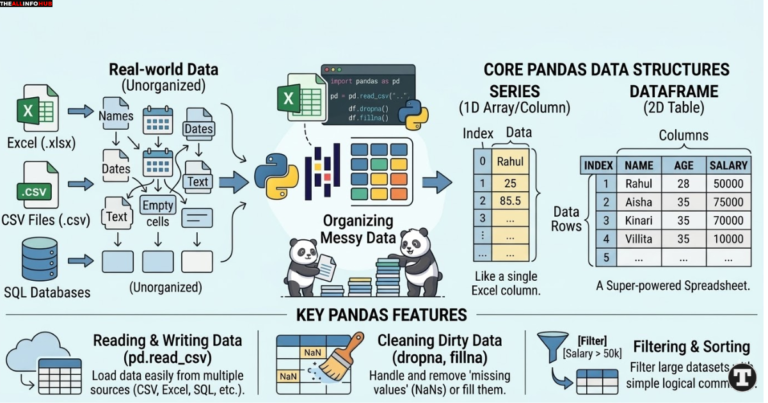
Now that we have NumPy to handle the heavy math, we need a way to organize our data. Real-world data is messy. It does not just come in simple lists of numbers. It comes in Excel files, CSV files, and SQL databases containing names, dates, text, and empty spaces.
This is exactly where Pandas shines. Created by Wes McKinney in 2008, the name Pandas comes from the term “Panel Data”.
If NumPy is the math genius, Pandas is the super-powered Excel spreadsheet inside your Python code. It is designed to make working with “relational” or “labeled” data easy and natural.
The Two Main Superheroes of Pandas:
Pandas gives you two amazing data structures to hold your information:
Series: Think of a Series as a single column in an Excel sheet. It is a one-dimensional list that can hold any type of data (integers, strings, floats), and every item has a unique label or index.
DataFrame: This is the absolute star of the Pandas library. A DataFrame is a two-dimensional table, exactly like an Excel spreadsheet or a SQL table. It has rows and columns. You can store names in one column, ages in the next, and salaries in another.
Why Do You Need Pandas?
Reading and Writing Data: Pandas can read data from almost anywhere. With a simple command like
pd.read_csv('data.csv'), you can load a massive dataset into your program in seconds. It can also read Excel files, JSON, and web pages.Cleaning Messy Data: In real life, datasets are full of missing values (blank cells) or incorrect formats. Pandas gives you magic commands like
dropna()to instantly remove missing data, orfillna()to replace missing data with a default value.Filtering and Sorting: Want to find all employees who earn more than $50,000 and live in New York? In standard Python, this would take many lines of complex logic. In Pandas, you can filter massive tables with just one line of simple code.
3. Pandas and NumPy in Python: How Do They Work Together?
As a beginner, you might wonder: “If both handle data, which one should I use?”
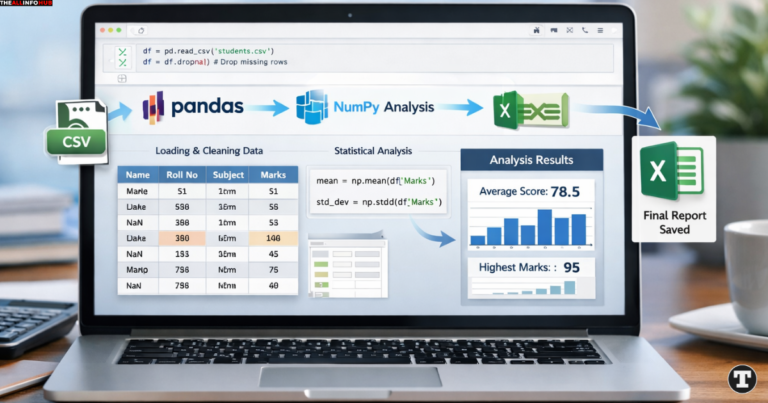
The truth is, you do not choose between them; you use them together! In fact, Pandas is actually built on top of NumPy. Whenever you create a Pandas DataFrame, underneath the surface, Pandas is using NumPy arrays to store that data and do the calculations.
Here is the best way to understand their relationship:
Use Pandas when you need to load a CSV file, look at the columns, clean up missing text, group data by categories, and understand the general structure of your dataset.
Use NumPy when you need to run complex mathematical formulas, matrix operations, or image processing on the raw numbers inside that dataset.
They are the ultimate dynamic duo. Pandas organizes the house, and NumPy provides the strong foundation.
4. A Simple Real-World Example
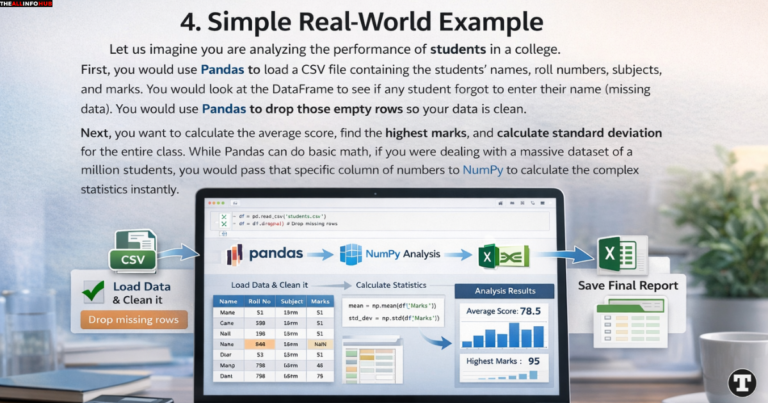
Let us imagine you are analyzing the performance of students in a college.
First, you would use Pandas to load a CSV file containing the students’ names, roll numbers, subjects, and marks. You would look at the DataFrame to see if any student forgot to enter their name (missing data). You would use Pandas to drop those empty rows so your data is clean.
Next, you want to calculate the average score, find the highest marks, and calculate the standard deviation for the entire class. While Pandas can do basic math, if you were dealing with a massive dataset of a million students, you would pass that specific column of numbers to NumPy to calculate the complex statistics instantly.
Finally, you might use Pandas again to group the students by their subjects and save the final, clean report into a brand new Excel file.
5. Why Should You Learn Them Today?

The tech industry is evolving rapidly. Every single company, from small startups to giants like Google and Amazon, relies on data to make decisions.
By mastering these libraries, you are unlocking the doors to some of the highest-paying and most exciting career paths in the world:
Data Analysis: You can uncover hidden trends in sales data or customer behavior.
Machine Learning: Before you can teach an AI model to predict the future, you must prepare the data. These tools are the very first steps in any Machine Learning pipeline.
Automation: You can say goodbye to doing boring, repetitive tasks in Excel. A short Python script can automate hours of data entry and formatting.
Conclusion
Learning Python is a great first step, but exploring its libraries is where the real magic happens. NumPy provides the raw speed and mathematical power required for heavy computing, while Pandas gives you the flexibility to clean, organize, and analyze data just like a professional.
Do not feel overwhelmed by all the functions and commands. Start small. Create a simple array in NumPy. Load a small CSV file using Pandas. Play around with the data, break things, and fix them. Practice is the key to mastering these tools.
FAQs: Pandas and NumPy in Python
Q1. Which one should I learn first: Pandas or NumPy? Ans: It is best to learn the basics of NumPy first. Because Pandas is actually built on top of NumPy, understanding how NumPy arrays work will make learning Pandas much easier and faster.
Q2. Do I need to be a math expert to use these libraries? Ans: Not at all! While NumPy is great for complex math, you only need basic math knowledge to get started. These libraries are designed to do all the heavy calculations for you automatically.
Q3. Can Pandas handle massive datasets like millions of rows? Ans: Yes, Pandas is very powerful and can easily handle Excel or CSV files with millions of rows. However, for extremely huge data (like Big Data), developers sometimes use advanced tools like PySpark.
Q4. Are Pandas and NumPy free to use? Ans: Yes, absolutely! Both Pandas and NumPy are 100% free and open-source. You can download and use them for personal learning or even build commercial software without paying anything.
Q5. How do I install Pandas and NumPy on my computer? Ans: Installing them is very simple. Just open your Command Prompt (Windows) or Terminal (Mac/Linux) and type pip install pandas numpy, then hit Enter. Make sure you have Python installed first!
- You might be interested in reading this page as well
- Future of Smart Glasses AR: Will They Replace Smartphones? – A Deep Dive (2026 & Beyond)